Appearance
Multi-table Queries
Importing sample data
For multi table queries we can use sample data from MySQL.
- Introduction
- Structure diagram
- Download (under Example Database section)
The Sakila download has 3 files.
- sakila.mwb
- MySQL WorkBench file, contains the table structure etc.
- sakila-schema.sql
- The database structure
- sakila-data.sql
- The data for the database
Run the schema file first and then import the data into created tables. Check Environment Setup for more instructions how to import data.
After importing the data, you should have following table structure in sakila database
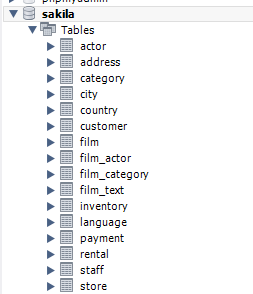
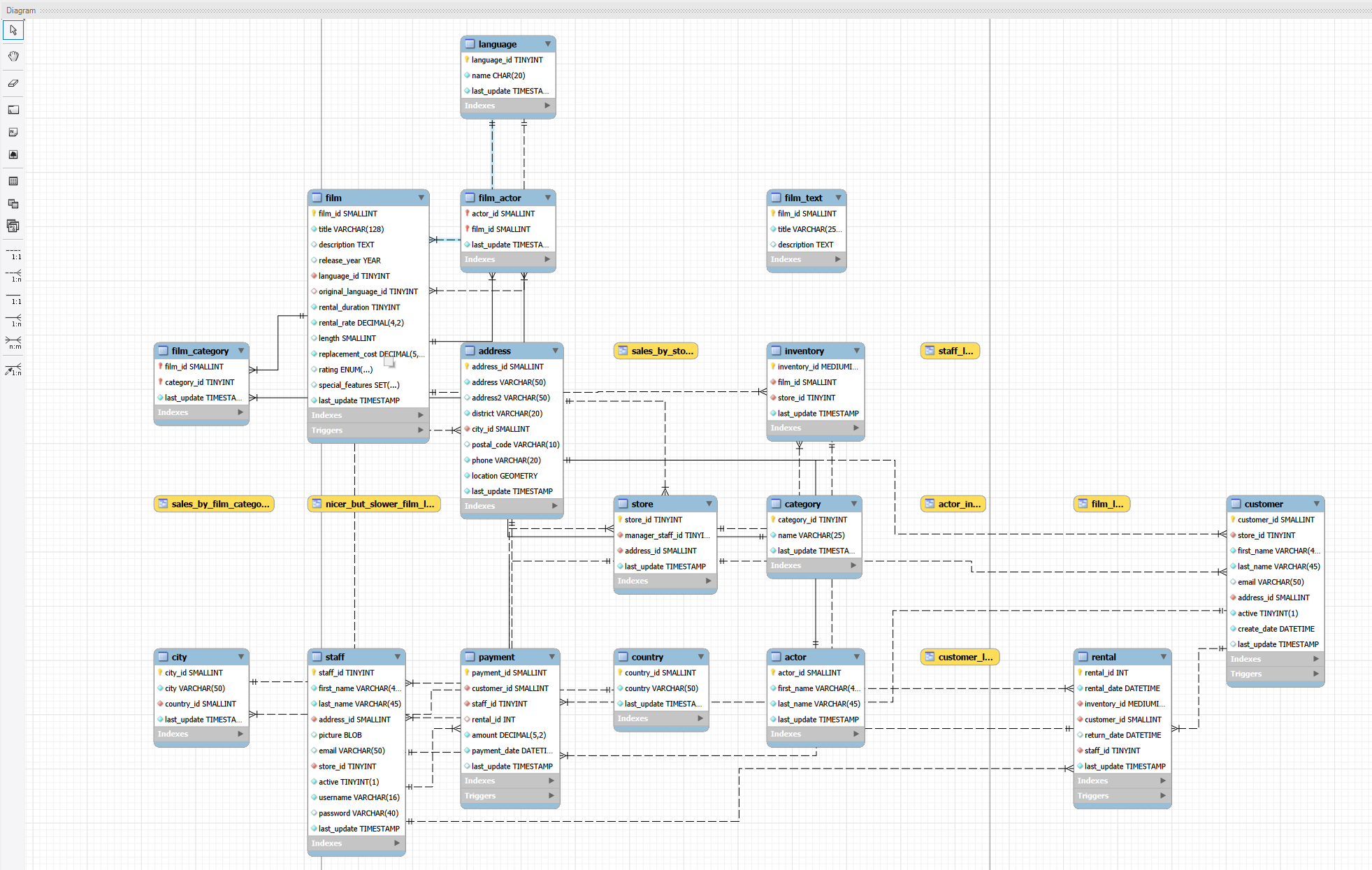
By opening the sakila.mwb file you can see detailed table structure, primary keys, relations etc.
About these samples
On this page, we focus on small subset of tables in sakila database.
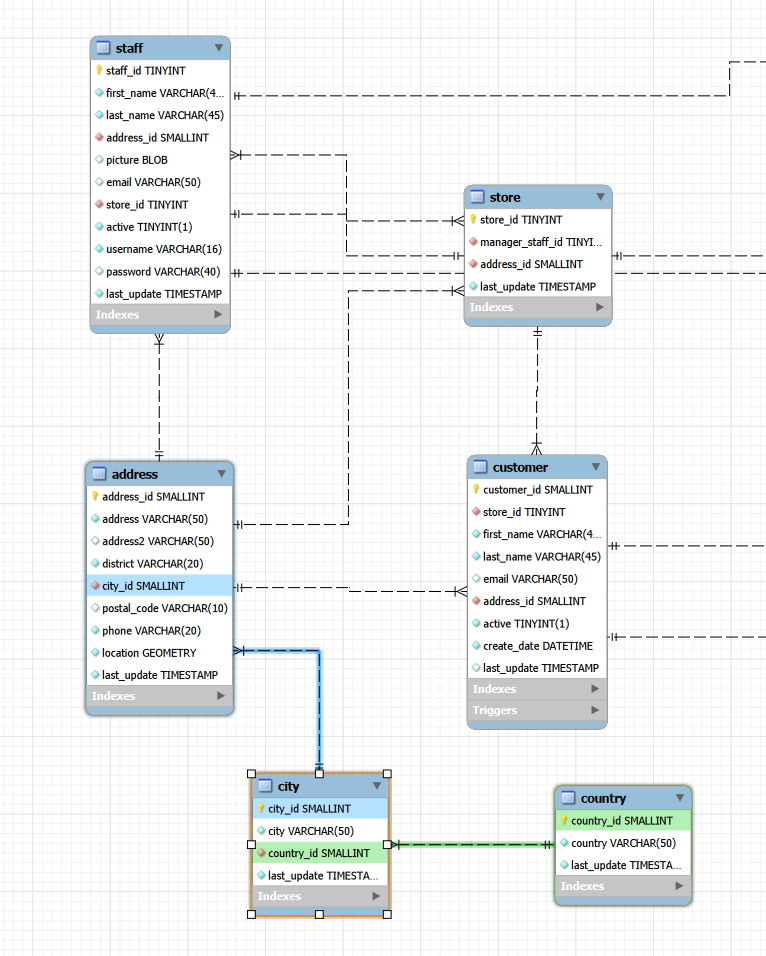
By hovering the city table in MySQL Workbench (open the sakila.mwb file). We can see following details:
addresstable has primary keyaddress_id(yellow key)- This is the distinctive identifier in this table, each of them must be unique
addresshas foreign key referencing thecity_idincitytable- This can be seen as a blue connection
cityhas primary keycity_id- This is the unique identifier for each city row
cityhas foreign key referencing thecountry_idin thecountrytable- This can be seen as green connection
Foreign keys usually reference the primary keys in other tables. The column types have to be same in both tables. These kind of relations are 1:N (one-to-one) relations. Each city references one and exactly one country and each address is in one and exactly one city. But each city can be in multiple addesses and each country can have multiple cities.
Multiple tables (implicit join)
You can query multiple tables by listing them in FROM and linking them in WHERE. This is the older syntax — explicit JOIN is preferred for clarity.
sql
SELECT *
FROM address, city
WHERE address.city_id = city.city_idOr to make it shorter to type
sql
SELECT *
FROM address a, city c
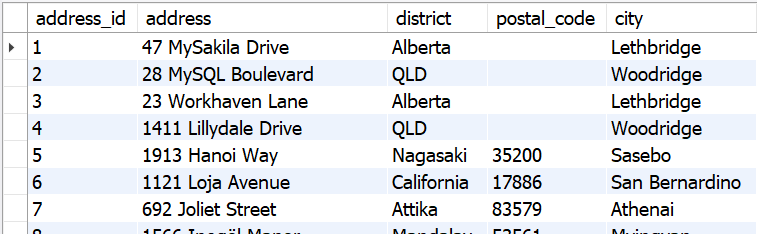
WHERE a.city_id = c.city_idWith this query we get all of the columns from both tables. Each address row has city information in the result. If we want only some of the columns, we can define them:
sql
SELECT a.address_id, a.address, a.district, a.postal_code, c.city
FROM address a, city c
WHERE a.city_id = c.city_idThis will show only selected columns.
Aliases
a and c are table aliases — short names that make the query easier to read.
Table aliases shorten long table names and are required when joining a table to itself.
JOINs
Joins combine rows from two or more tables based on a related column. There are multiple types of joins.
 (Image source: https://www.w3schools.com/sql/sql_join.asp)
INNER JOIN
Returns only rows that have a match in both tables. If there is no matching pair, the row is left out of the data. The matching criteria is defined after ON in the query.
Here is the same query as above written with JOIN
sql
SELECT a.address_id, a.address, a.district, a.postal_code, c.city
FROM address a
JOIN city c ON a.city_id = c.city_idThis returns 603 rows.
In this case the city_id column of the row from address table (foreign key) must match the city_id column for the row in city table (primary key).
If there is no city record matching the city_id in address table, the address row will not be included in the result.
However, with
sql
SELECT COUNT(DISTINCT city_id) AS citycount FROM address;We can see that we have 599 different cities referenced with 603 addresses. And with
sql
SELECT COUNT(*) FROM city;we can see that there are 600 different cities. One of them is not used in the data.
LEFT JOIN
Returns all rows from the left table, and matching rows from the right table. If there is no match, the right side columns are NULL.
sql
SELECT a.address_id, a.address, a.district, a.postal_code, c.city
FROM address a
LEFT JOIN city c ON a.city_id = c.city_idIn this case, all of the addresses have matching county on the right side, so the result is similar to inner join. If there would be a invalid city reference to a city that does not exist in city table, there would be null values in those columns.
RIGHT JOIN
Returns all rows from the right table, and matching rows from the left table. If there is no match, the left side columns are NULL.
sql
SELECT a.address_id, a.address, a.district, a.postal_code, c.city
FROM address a
RIGHT JOIN city c ON a.city_id = c.city_id
ORDER BY a.address_idAll cities will now be included and matching rows from the address table will be also present. This result is 604 rows. Now we can see that one of the cities does not have any addresses

So, London does not have any matching addresses.
INFO
Some DBMS might not have RIGHT JOIN. Same result can be achieved by switching the table order in a LEFT JOIN query.
This RIGHT JOIN:
sql
SELECT a.address_id, a.address, a.district, a.postal_code, c.city
FROM address a
RIGHT JOIN city c ON a.city_id = c.city_id
ORDER BY a.address_idCan be rewritten as a LEFT JOIN by swapping the tables:
sql
SELECT a.address_id, a.address, a.district, a.postal_code, c.city
FROM city c
LEFT JOIN address a ON a.city_id = c.city_id
ORDER BY a.address_idBoth queries return same data
FULL OUTER JOIN
MySQL does not support full joins, but some DBMS do. Basically this will select everything from left and right table even if there is no matching pairs.
JOIN comparison
| JOIN type | Left table rows | Right table rows |
|---|---|---|
| INNER JOIN | Only matched | Only matched |
| LEFT JOIN | All | Only matched |
| RIGHT JOIN | Only matched | All |
| FULL OUTER JOIN | All | All |
Joining multiple tables
What if we want to combine the address, city and country to get the complete address? We need to combine all 3 tables.
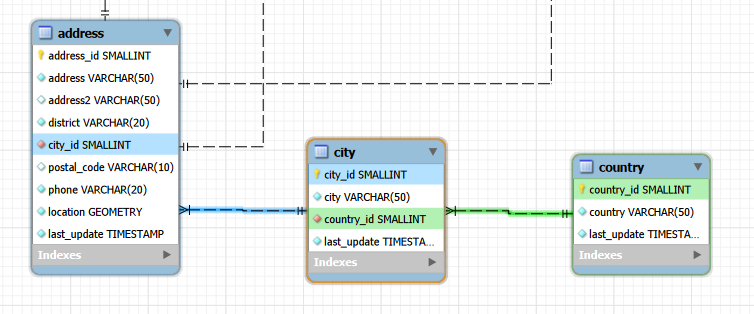
You can chain multiple joins to connect more than two tables. The joins needed are the connections highlighted between the tables. With 3 tables, you need 2 joins.
sql
SELECT a.address_id, a.address, a.district, a.postal_code, c.city, co.country
FROM address a
JOIN city c ON a.city_id = c.city_id
JOIN country co ON c.country_id = co.country_idHere we have
address-cityjoin with requirement thataddress.city_id = city.city_idcity-countryjoin with requrement thatcity.country_id = country.country_id
Now the addresses match cities and cities match the countries.
Many-to-many relations
We can have relations that reference multiple items in both ways. One example can be seen in film-category relation.
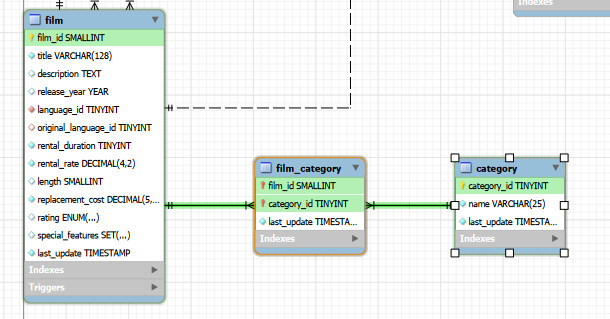
Because each film can be in multiple categories and each category can have multiple films, this relation needs a junction table. The junction table acts as a mapping table between the combinations. Many to many relations are usually also marked with m:n in the drawings.
In the picture you can see that there is no separate primary key in the film_category junction table. This is because the two foreign key columns are a combined primary key. This also means that the film_id and category_id combinatios have to be unique.
In queries, this acts as a normal relation, but you will get a row per film-category combination.
sql
SELECT
    f.title,
    c.name AS category
FROM film f
JOIN film_category fc ON f.film_id = fc.film_id
JOIN category c ON fc.category_id = c.category_id
ORDER BY f.title, c.name;In the sample data, there is only one category per film.
To add a category for a film, you need to insert a film_id and category_id combination into junction table.
General tips
INFO
With multi table queries you can still use WHERE, GROUP BY, ORDER BY, HAVING, subqueries etc. as usual. Just when referencing the column names, use the format table.columname. These also come after the JOIN.
TIP
If you get a result that has more rows than the largest table in the query has rows, you propably have one of the following
- Wrong joining criteria
- Missing joining criteria
Each table relation needs its own ON condition between the two tables that connect to each other.
Without any restrictions / wrong restrictions, the result is cartesian product of the data in the tables. In this case, a single row is paired with every row of the second table and this is repeated for every table. If you have tables with 20 rows and 1000 rows of data, the result would be 20 000 rows of data.